
Guides → Data & destruction
Degaussing, shredding or wiping: which data destruction method do you need?
Three methods, and the wrong one on the wrong media leaves your data fully intact behind a certificate that says otherwise. The deciding factor is not sensitivity or budget. It is the physics of how the media stores a bit.
The framework everyone references
NIST Special Publication 800-88, Guidelines for Media Sanitization, is the standard UK and US organisations cite, and it defines three levels:
- Clear — overwrite using standard read/write commands. Defeats ordinary recovery software.
- Purge — apply a technique that defeats laboratory recovery, including degaussing and firmware-level sanitise commands.
- Destroy — render the media physically unusable and incapable of being read by any means.
The critical detail, and the one most often skipped: 800-88 specifies different valid techniques for different media types. Degaussing is a Purge technique for magnetic media and is explicitly not valid for flash. The standard is a lookup table, not a ladder you climb.
How each storage type actually holds data
Everything follows from this, so it is worth thirty seconds.
A mechanical hard drive stores bits as microscopic magnetised regions on a spinning platter. Orientation of the magnetic field is the data. Change the magnetism and the data is gone at the physical level — there is nothing left to recover because the thing that encoded it no longer exists in that state.
A solid state drive stores bits as electrical charge trapped in floating-gate transistors inside flash memory chips. There is no magnetism involved anywhere in the process. A magnetic field does essentially nothing to trapped charge.
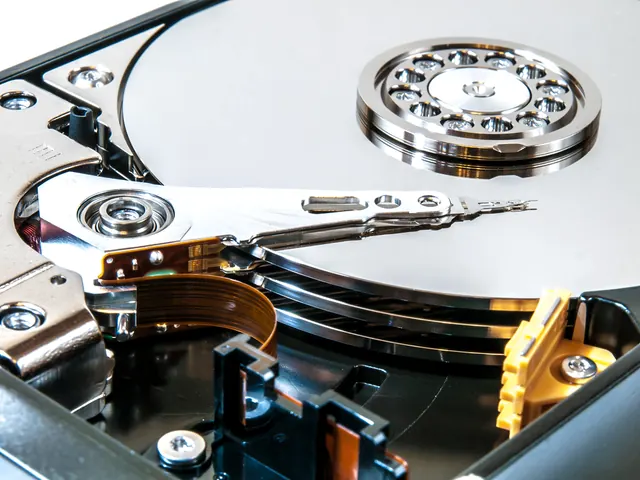 Degauss
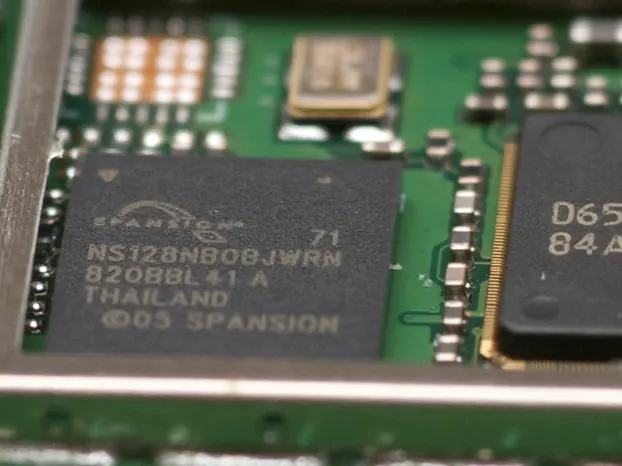 Shred
ShredThat single difference drives every decision below.
Method 1: Overwriting (software wiping)
What it does. Software writes new data across every addressable sector, then reads it back to verify. Good tools produce a per-drive report with the serial number, the pattern used and the verification result.
Where it works. Healthy drives of any type that you intend to keep using, resell or donate. It is the only method that leaves you with working hardware, which makes it the right default when the device still has value.
Where it fails. Three places, and they matter.
- Reallocated sectors. When a drive detects a failing sector it retires it and swaps in a spare. The retired sector still holds its data but is no longer addressable, so an overwrite pass cannot reach it.
- Over-provisioning on SSDs. Solid state drives reserve a chunk of capacity — often 7% or more — invisible to the operating system, and the controller rotates data through it for wear levelling. A conventional overwrite never touches it. This is why SSDs need the drive's own firmware sanitise command rather than a naive overwrite.
- Drives that will not respond. A dead or failing drive cannot be wiped, and a dead drive is not a blank drive. Its platters are still readable in a lab.
Verdict. Correct and fully compliant when the hardware is healthy and being kept in service, provided you use tooling that handles SSDs properly and you keep the verification reports. Not an option for failed drives.
Method 2: Degaussing
What it does. The drive passes through a magnetic field strong enough to saturate the platters, randomising every magnetic domain at once. It takes seconds and does not depend on the drive being functional or even connected.
It also destroys the servo tracks — factory-written magnetic reference marks the drive's head uses to position itself. They cannot be rewritten outside a manufacturing environment, so a degaussed hard drive is permanently inoperable. That is a feature: the device cannot be quietly returned to service with data still on it.
Where it works. Mechanical hard drives, including failed ones. Server, SAN and NAS disks. LTO, DLT and DAT backup tapes. Floppy disks and other legacy magnetic media.
Where it fails. Everything that is not magnetic. Run an SSD, USB stick, SD card or phone through a degausser and every byte survives. This is the single most common and most dangerous mistake in the industry, because the process looks identical and the certificate prints the same either way.
One practical caveat: degaussers are rated in oersteds and must be matched to the coercivity of the media. Modern high-density drives need a properly rated machine, which is why the equipment specification is a fair question to ask a supplier.
Verdict. The fastest and most thorough answer for magnetic media at end of life, and the only method that works on a drive that has already died. Completely useless on flash.
Method 3: Physical shredding
What it does. The media is fed through a shredder that reduces it to fragments.
Where it works. Solid state media of every kind — SATA and NVMe SSDs, M.2 drives, USB sticks, SD and CF cards, phone and tablet storage — plus optical discs, and any magnetic drive where a customer specifically wants physical destruction as well.
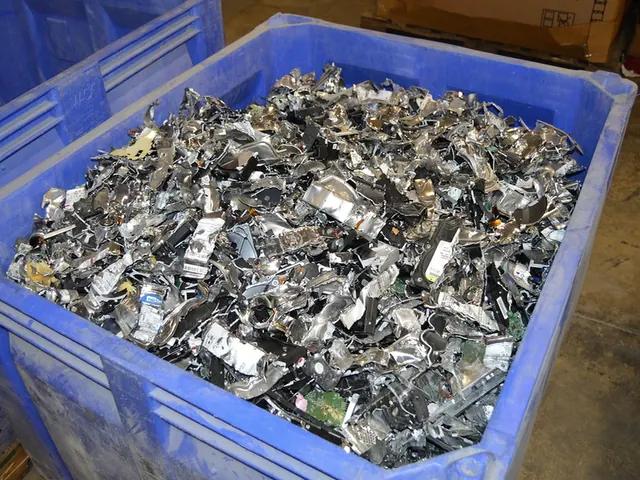
What to check. Shred particle size is the whole game for flash. Flash memory chips are small, and if the output fragments are larger than an intact chip, a determined attacker can perform chip-off recovery: desolder the surviving chip and read it directly on a programmer. A shredder that turns a 3.5" hard drive into large chunks is fine for that drive and inadequate for the SSD next to it. Ask what particle size the machine achieves and confirm it is rated for solid state media.
Verdict. Mandatory for flash, since it is the only method that reliably works. Valid for magnetic media too, though degaussing is usually faster and leaves materials in better condition for recovery.
Choosing, in one table
| Media | Keeping the hardware | End of life |
|---|---|---|
| Mechanical hard drive (working) | Verified overwrite | Degauss |
| Mechanical hard drive (failed) | Not possible | Degauss |
| Backup tape | Overwrite | Degauss |
| SSD / NVMe / M.2 | Firmware sanitise, verified | Shred |
| USB stick, SD card | Rarely worth it | Shred |
| Phone / tablet | Factory reset with encryption on | Shred |
| Optical disc | Not possible | Shred |
Questions worth asking any supplier
- Which method do you apply to hard drives, and which to SSDs? Anything other than two different answers is a problem.
- What particle size does your shredder achieve on flash media?
- What is your degausser rated to in oersteds?
- Does the certificate record the method used against each individual serial number?
- How do you handle drives that have already failed?
- Can we witness the process?
The first question is the one that separates a considered process from a single machine that everything gets fed through.
What we do
We degauss magnetic media and shred solid state media, because that is what the physics requires. Healthy drives with resale value are sanitised and verified instead, so the hardware stays in service. The method applied to each device is recorded against its serial number on the certificate — see what a certificate should contain, or read more about our data destruction service.
Not sure what you have? Tell us roughly what is in the cupboard and we will tell you what each item needs.
Ask us